
GeoViewer Online Just Got a Major Upgrade: Smarter, AI-Powered, and Built for Actions
GeoViewer Online has always been a powerful platform for turning geospatial data into meaningful business intelligence. Today, that capability takes a significant step forward, with new tools designed to make data more accessible, more actionable, and more intelligent.
At the center of this release is the introduction of an AI Chat Bot embedded directly within the GIS BI module, transforming how users interact with their data. Combined with redesigned core experiences and new capabilities like configurable dashboards and large-scale work order search, GeoViewer Online is evolving into a more intuitive, decision-focused platform.
This update is not just about enhancements—it’s about enabling teams to move from data access to intelligent action, faster and with greater clarity.
Let’s walk through what’s new, what’s improved, and what it means for your business.

A New Standard for Geospatial Information System Business Intelligence (GIS BI): Now with Built-in AI
The GIS BI module introduces a smarter, more interactive way to explore geospatial data—bringing together visualization, reporting, and AI-driven insights in a single experience.
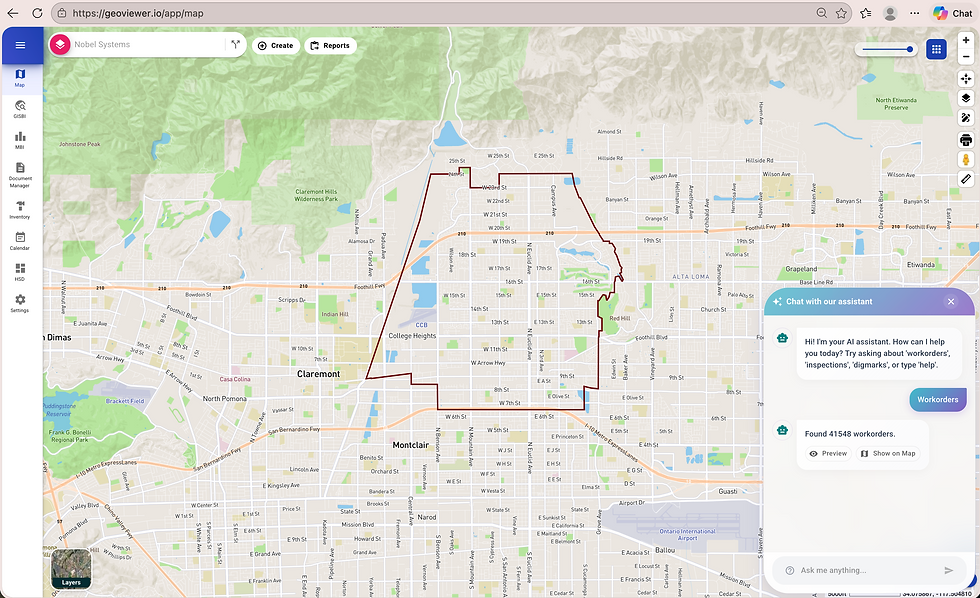
What's New in GIS BI
Integrated AI Chat Bot for smarter insights and guided data exploration
A fully redesigned interface with a modern, polished look
Interactive map markers that respond dynamically to user input
High-detail popups, including Street View integration
Live record counts in the Pipelines tab
Direct export of filtered data to PDF and CSV
Built-in capability to share maps via email
This isn’t just a redesign—it’s a shift in purpose. GIS BI now goes beyond visualization—enabling users to analyze, generate outputs, and share insights instantly, all within a single workflow.
Why It Matters
Organizations today are working with increasingly large and complex datasets—especially for work orders, assets, and field operations. Finding the right information quickly is critical.
Instead of:
Viewing data → exporting manually → formatting reports
You can now:
Filter → analyze → export → share
All in one place.
The addition of the AI Chat Bot is especially impactful. Instead of manually navigating through filters or datasets, users can interact with their data more intuitively, making GIS BI not just reactive, but also proactive in delivering insights.
GIS BI Feature Walkthroughs
Built-in AI Chat Bot for smarter interactions/insights

Sleek, fully redesigned interface

Interactive, data-driven map markers

High-detail pop-ups with Street View

Real-time pipeline record counts

One-click PDF/CSV export

Easy map sharing via email

Management/ Mobile Business Intelligence (MBI): AI-Powered, Configurable, and Built Around Your Workflow
The Management/Mobile Business Intelligence (MBI) module has been redesigned to give users greater control over how they interact with operational data.
Rather than a fixed experience, MBI now adapts to the way your team works.
What's New in MBI
Modern UI with smart Auto Complete and date filtering
Pin and access favorite views instantly
Refreshed summary cards for clearer insights
New Maintenance BI with configurable dashboards
Why It Matters
MBI is built for speed, clarity, and control—especially for teams that rely on data throughout the day.
With a modernized interface, faster Auto Complete, and an improved Date Range experience, users can access the right data with minimal effort. Refreshed summary cards make insights easier to understand at a glance, while pinned favorites streamline repeat workflows.
The addition of Maintenance BI with configurable dashboards takes this further—allowing teams to tailor views based on their specific roles, priorities, and KPIs.
The result: easier access to insights, more relevant data views, and a workflow that adapts to how your team works.
MBI Features Walkthrough
Pin and access favorite views instantly

Modern UI with smart Auto Complete and date filtering

NEW: Maintenance BI Configurable Dashboard
One of the most important additions in this release is Maintenance BI, designed to give teams full control over how they view and monitor operational data.
What It Is
A fully configurable dashboard that allows users to build and tailor their own data views based on operational priorities.
How It Works
Users can:
Select and arrange data widgets
Customize metrics and KPIs
Define date ranges and filters
Save personalized dashboard views for ongoing use
Why It Matters
Instead of working with fixed dashboards, teams can now create role-specific, task-driven views—whether for field operations, maintenance tracking, or executive reporting.
With configurable dashboards:
Teams can create role-specific views
Data becomes more relevant and actionable
Users spend less time navigating and more time analyzing
This turns MBI into a dynamic decision-support tool, not just a data viewer.
From Insights to Action: A Key Shift
One of the most important themes of this release is the transition from data viewing to actionable intelligence.
Before | After |
GeoViewer Online primarily enabled users to: | It empowers users to: |
|
|
This shift is especially valuable for B2B organizations where data needs to move quickly from analysis to decision-making.
Looking Ahead: What's Coming Next
The improvements don't stop here.
Upcoming Feature: Advanced AI Capabilities
Building on the newly introduced AI Chat Bot, the next release will introduce more advanced AI-driven capabilities designed to further simplify how users interact with data.
These enhancements will focus on:
Deeper, context-aware insights
Faster data interpretation
More intuitive, conversational interactions
The goal is to make data exploration even more seamless, helping users move from questions to answers with minimal effort, and from insights to action even faster.
Driving Smarter Decisions Across Your Organization
Whether you’re an existing client or evaluating GeoViewer Online for your organization, this release highlights a clear direction:
Faster performance → less waiting, more productivity
Better usability → shorter training time, higher adoption
Stronger reporting tools → quicker decision-making
Enhanced stability → more reliable operations
In short, GeoViewer Online is evolving into a complete geospatial intelligence platform—not just for analysis, but for action.
The Future of Geospatial Intelligence Starts Here
This latest release introduces a more intelligent, flexible, and user-driven GeoViewer experience.
By embedding AI directly into workflows, enhancing how users search and interact with data, and enabling customizable dashboards, GeoViewer Online is redefining how geospatial intelligence supports business operations.
For existing users, this is an opportunity to unlock new efficiencies and capabilities.
For organizations exploring GIS-powered BI solutions, it represents a platform built for modern demands—where intelligence, usability, and action come together.
About Nobel Systems
Nobel Systems, Inc. is a leader in Cloud GIS and Smart Utility Solutions, delivering innovative mapping technology, data services, and strategic consulting to support sustainable public service operations. Founded in 1992 and headquartered in Redlands, California, Nobel Systems, Inc. serves clients across the United States and internationally.
Learn more at www.nobel-systems.com


